


Lately, a number of Marvel Rivals players have been reporting facing the “failed to connect to Steam” error when trying to play the hero shooter. The infamous error code 5 prevents players from logging into the Marvel Rivals game servers and consequently renders them unable to play the game.
The Marvel Rivals “Failed to connect to Steam” error code 5 can be caused by several reasons, ranging from server-side issues, such as scheduled maintenance or Steam servers being down, to problems with your own internet connection. However, in many cases, the error may not be out of your control and can often be resolved quickly with just a few simple troubleshooting steps.
If you’re encountering the “failed to connect to Steam” error code 5 in Marvel Rivals and are looking for solutions, we’ve got you covered.
How to Fix Marvel Rivals Failed to Connect to Steam Error
The first thing you should try doing upon getting the Marvel Rivals “failed to connect to Steam” error code 5 is to check your internet connection. Turn off your router, wait 30 seconds before turning it back on, and try logging into the game again.
If your internet connection is working fine, look for any potential problems with Steam servers or with Marvel Rivals servers. You can check the server status for Marvel Rivals or Steam via third-party websites like DownDetector.
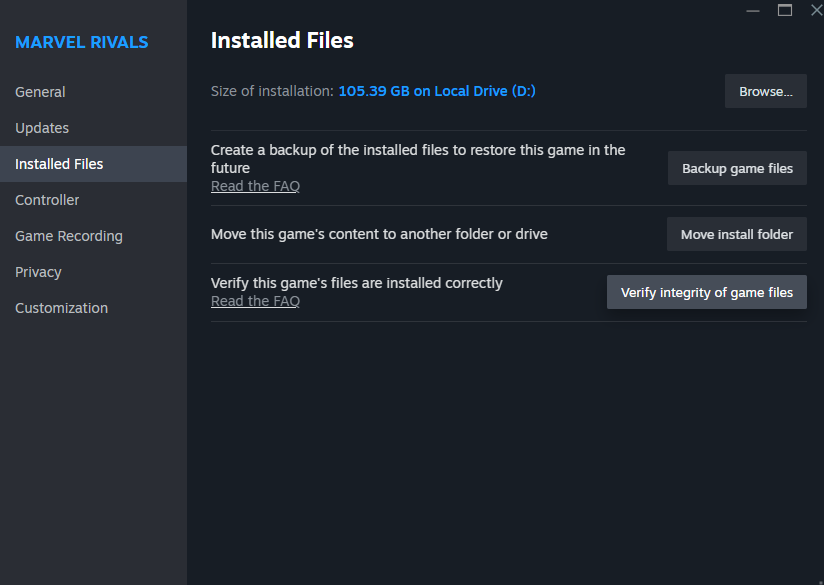
If you notice that both the Steam and game servers are up and running, you’ll need to verify your file integrity to fix this issue. To do so, right-click Marvel Rivals on your Steam Library and head to Properties > Installed Files. Now, simply click on “Verify Integrity of Game Files” and wait till the verification process is complete.
That’s everything you need to know about how to fix the “failed to connect to Steam” error code 5 in Marvel Rivals.
