

Being a live service game, Marvel Rivals constantly receives new updates that introduce fresh additions to the game, including playable characters, cosmetics, and more, alongside regular balance changes to keep the meta exciting. As a result, it’s important to always keep your game updated to the latest version to avoid missing out on new content and get started with new Battle Passes and other in-game events as soon as they drop.
If you’re a new Marvel Rivals player, you might find yourself getting confused about how to update Marvel Rivals to the latest version
In this article, we’ll take a look at how to update Marvel Rivals and how to keep your game updated by automatically downloading any patches as soon as they drop.
How To Update Marvel Rivals
Below, we’ve outlined all the steps you’ll need to follow to update Marvel Rivals to its latest version. Note that this guide is tailored for PC players, walking you through what you need to do to update Marvel Rivals without any hassle.
- Launch Steam
- Go to your Library
- Find Marvel Rivals from the list of games and click on it
- If there’s a pending update, you’ll be able to see an ‘Update’ button

- Wait for the update to complete and hit ‘Play’
If you want Marvel Rivals to update automatically whenever a new patch goes live, simply head to your Steam settings, and under the ‘Downloads’ tab, ensure that ‘Updates to installed games’ is set to ‘Let Steam decide when to update’.
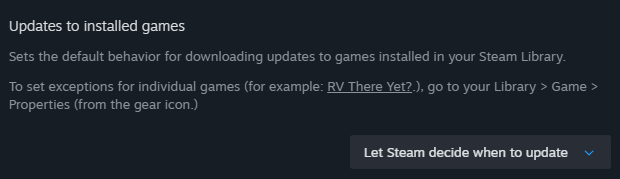
Upon doing so, any update that is shipped to Marvel Rivals will automatically be downloaded in the background as long as you have Steam running on your PC.

