Friday, December 5, 2025
GuidesHow to Show FPS in Valorant

How to Show FPS in Valorant

View the live FPS counter in Valorant.

-

FPS gamers love high frame-rates. Higher FPS (frames per second) definitely gives you a competitive advantage. Therefore, if you have a high-end PC with flagship processor and GPU, you are going to get a lot of FPS that will help you to peek corners faster with a super smooth experience. It will help you to react faster as well.

Valorant is one of the most popular FPS games these days. If you play Valorant a lot, you will definitely want to see how many FPS you are getting. Cause the more FPS you will get the more you will be able to play better. Therefore, you need to know how to view FPS in Valorant.

How to enable FPS counter in Valorant?

  • Head to Settings from the main menu. This will be located on the top left area of the screen.
  • Once it is opened, go to the Video tab.
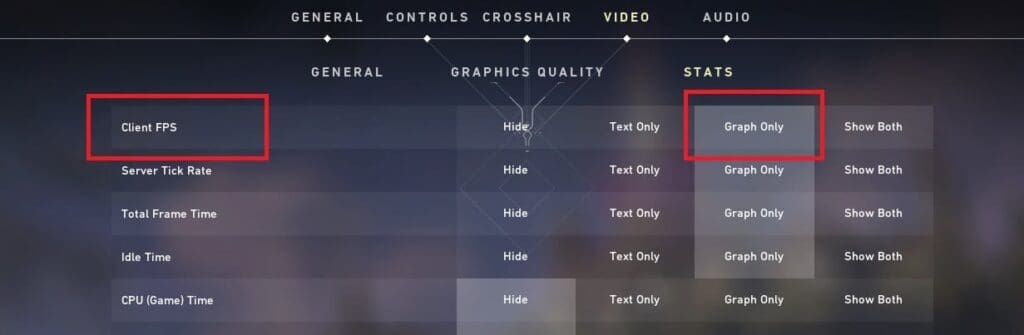
  • Under Stats, check for Client FPS.
  • Choose how you want the FPS to be shown – as text, as a graph or as both.

How to view FPS in Valorant

To show your FPS in Valorant, head over to the “Client FPS” setting in the “Stats” settings under the “Video” settings tab. The image below shows exactly where you can find this in Valorant.
Valorant FPS Counter
Regular

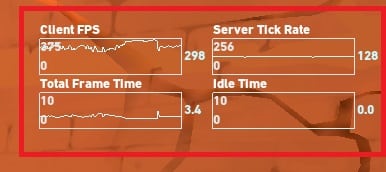
Now it’s upto you which one do you prefer. Generally, most of the players go for the Text Only option that shows you the live FPS counter on the top-left corner of the screen. However, if you choose the Graph only option, it will show the live FPS graph on the right side of the screen.


Aritra Patra
Aritra Patra
Aritra leads the editorial charge at TalkEsport. Away from the keyboard and deadlines, you can find him playing CS2, Valorant, and occasionally EA FC.

Other Originals

PUBG Mobile 4.2 Update Beta Revealed Prime Wood Genesis Mode and New Features

The PUBG Mobile 4.2 update beta has revealed an exciting new Prime Wood Genesis theme mode based on nature....

StarLadder Budapest Major 2025 Stage 3 Day 1 Recap

Stage 3 Day 1 of the StarLadder Budapest Major 2025 delivered thrills with MOUZ, Imperial, G2, and Spirit advancing to 1-0, while FaZe upset Vitality and B8 stunned Falcons. Detailed scores, maps, and analysis from all 8 CS2 matches.

India’s last hope True Rippers eliminated from PMGC 2025

After Orangutan, the second and final Indian team in the PUBG Mobile Global Championship (PMGC) 2025, True Rippers, has...

How to Check Your Valorant Flashback 2025 Report

Valorant Flashback 2025 is live, offering players a fun recap of their 2025 stats including agent performance, clutches, and squad highlights. Access it easily by entering your Riot ID on the official site.

From the Editor's Desk

Upcoming BGMI Tournament To Offer India a Direct Slot at PMGC 2025 – Sources

According to sources familiar with Krafton’s esports roadmap, India may soon be handed a direct path to the world...

Sources: Krafton to Host Two Major BGMI Tournaments in Second Half of 2025 as Franchise League Gets Cancelled

According to sources close to TalkEsport with direct knowledge of Krafton’s plans, have revealed that the publisher is preparing...

Must read

Roblox Clicker on Scratch Codes for September 2023

Roblox Clicker on Scratch offers an engaging clicker experience,...

Mortal Kombat 1 to Get Homelander Soon

The arrival of Homelander and Ferra indicates major development...
- Advertisement -

You might also likeRELATED
Recommended to you