

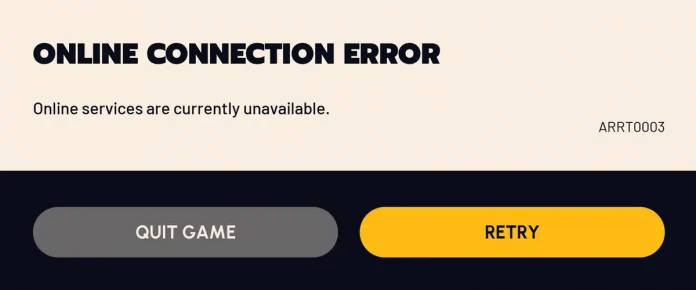
Among the various issues that you can run into when trying to play a game of Arc Raiders, the ARRT0003 error is undoubtedly the most frustrating one.
The ARRT0003 “Online Connection Error,” which can even pop up when you’re in the middle of a raid, renders you completely unable to join the Arc Raiders servers. If you’re unlucky, you may also end up losing all your gear if the disconnect happens before you can extract and you’re unable to join back in time.
If you’re facing the infamous ARRT0003 error in Arc Raiders, don’t worry, you’re not alone. Numerous Arc Raiders players have reported running into this annoying problem when trying to get into games recently, with many claiming that they’ve lost all their gear as a result.
Luckily, in many cases, the ARRT0003 can be resolved by following a few simple steps.
Arc Raiders ARRT0003 Error: How to Fix
As mentioned earlier, the Arc Raiders ARRT0003 error is primarily caused when the game is having trouble connecting to the live servers.
With that being said, let’s take a look at what you can do to fix this problem:
- Check Server Status: The first thing you should do upon encountering the ARRT0003 error in Arc Raiders is check the game’s server status. You can do so by joining the official Arc Raiders Discord server or via third-party sites like Downdetector. If you see a spike in the number of outage reports, there’s a good chance that the Arc Raiders servers are down. If that’s the case, you have no other option than to wait it out until Embark resolves the issue and puts the servers back up.
- Check Your Internet Connection: If the Arc Raiders servers are up and running, the problem might lie in your internet connection. Double-check your internet to see if everything is working fine. You should also try turning off your router, waiting 30 seconds, and turning it back on before trying to log into the game again.
- Verify Game Files: If the game servers as well as your internet connection are working fine, then your Arc Raiders game files might be corrupted. To verify the integrity of your game files, go to your Steam Library and right-click Arc Raiders. Then, go to Properties > Installed files and hit “Verify Integrity of Game Files.”

Now all you need to do is wait for the verification process to finish, which can often take a while depending on your system specifications. Once your files are verified, you should be able to log back into the game.
- Check Firewall Settings: The Arc Raiders ARRT0003 error can be triggered when your Windows Firewall is blocking Easy Anti-Cheat from connecting with the game servers. To fix this, hit the Windows key on your keyboard and type “Allow an app through Windows Firewall.” Then go to “Change Settings,” and find ARC Raiders. Check both the “Private” and “Public” boxes.

If you can’t see it, you’ll have to click “Allow another app,” browse to where the game is installed on your PC, and select “ArcRaiders.exe.”
Be sure to disable any VPNs running on your PC as well before launching the game.
If you followed the aforementioned steps correctly, your Arc Raiders ARRT0003 error should already be fixed. If the problem persists, you should get in touch with Embark’s player support team and let them know about your concern.

