

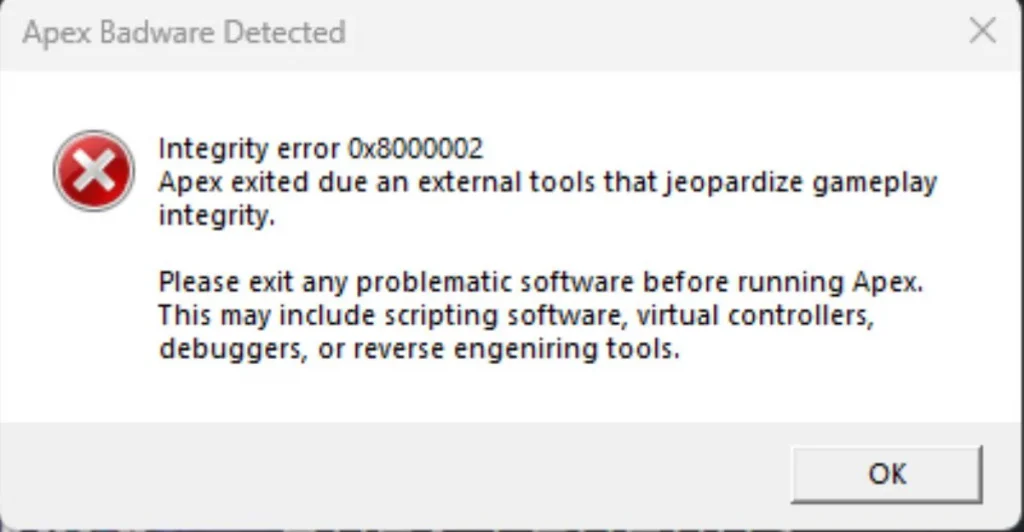
The “Integrity Error 0x8000002 – Apex Badware Detected” has become one of the most frustrating obstacles preventing players from launching Apex Legends. This happens when Easy Anti-Cheat, the anti-cheating system that the game uses, picks up additional software it thinks is compromising the integrity of the gameplay. More often than not, these are just false alarms by some program you may have installed and forgotten about.
The usual suspect is Daemon Tools Lite, a program used to emulate virtual drives. The list of problematic applications goes on to include Discord overlays, NVIDIA GeForce overlays, virtual controller mappers such as DS4Windows, macro software like AutoHotkey, and even overclocking and monitoring tools like MSI Afterburner. Even the system utilities you don’t use, like Cheat Engine or previously installed modding software, may cause this error.
How to Fix Badware Detected Error in Apex Legends?
Begin with the most straightforward solutions first. First, restart your PC and launch Apex Legends as an administrator. This clears up memory issues and gives proper permissions to your system. Next, disable the overlay software in Discord, Steam, and NVIDIA settings. Some of these steps alone have worked for many players.
If overlays aren’t the issue, check your game files. On Steam, right-click Apex Legends, then click Properties > Installed Files > Verify integrity of game files. On the EA App, go into your game settings and select Repair.
Completely uninstall Daemon Tools if errors are persistent. Most users report successfully clearing up the error immediately after removal. Restart your computer afterward. If the error persists, repair Easy Anti-Cheat by running the EasyAntiCheat_Setup.exe file and selecting “Repair Service”.
If all else fails, please reach out to EA support with your username, platform, and a screenshot of the error. Though frustrating, the solution usually only takes a few minutes once the conflicting software is identified.

? Learn easy fixes including uninstalling Daemon Tools, disabling overlays, verifying game files, and repairing Easy Anti-Cheat to get back in the game hassle-free.)